

Portfolio tracking in Google Sheets™
— with the accounting your broker skips
Stocks, options and crypto in one ledger you own. Every sale matched to purchase lots — FIFO or LIFO — across all your brokerage accounts.
- Your data never leaves your Google account
- No signup for the 14-day trial, or the free tier after it
- No credit card to start
- The developer cannot see your spreadsheet
Built for a specific kind of investor
tradeGIST does a narrow job very thoroughly.
If it is not your job, a simpler tool will serve you better.
Built for you if
- You trade actively across more than one brokerage account, and nobody hands you a consolidated view.
- You hold assets priced in a currency that is not the one you pay taxes in.
- You trade options or crypto alongside stocks and are tired of three separate trackers that disagree with each other.
- Your broker or tax authority leaves the cost basis calculation to you.
- You are comfortable in a spreadsheet and want to own the file your records live in.
Not for you if
- You buy an index fund every month and hold it. Your broker's app already tells you everything you need. This tool would be overhead.
- You want your broker connected by API. tradeGIST has no broker connections — you import your own transaction history. If you won't do that once, stop here.
- You want software that files your taxes. tradeGIST prepares the numbers; it does not produce or submit tax forms.
- You hold one asset class, in one account, in one currency. Most of what this add-on does, you would never use — a free template will serve you fine.
- You don't want to work in a spreadsheet. Everything happens in Google Sheets™; there is no app.
Every View, Generated From One Google Sheets™ Ledger
Replace scattered tabs and manual calculations. Each sheet below is computed from your transaction history, not maintained by hand.
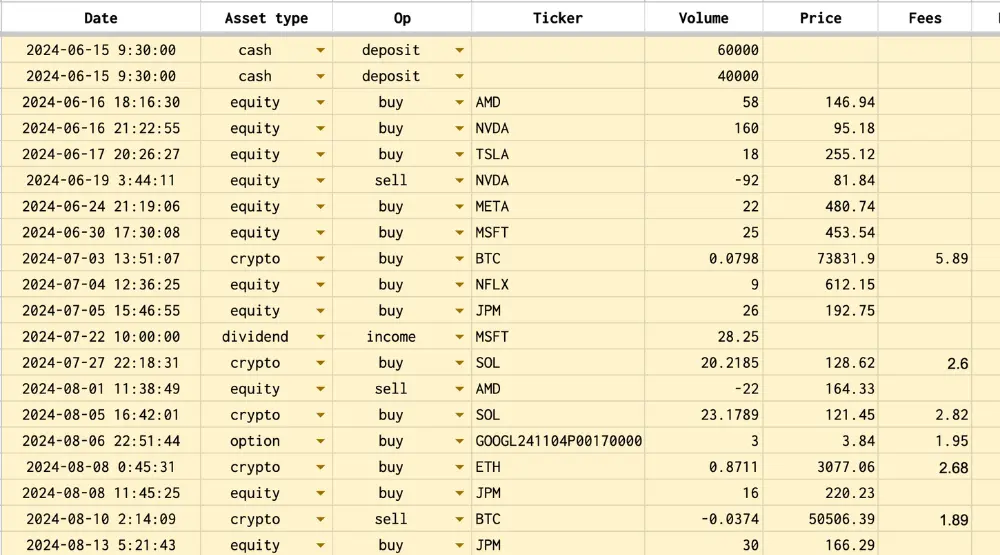
One Master Ledger for Every Transaction.
Stocks, crypto, options, dividends, and cash transactions live in a single ledger — the one source every other view is computed from.
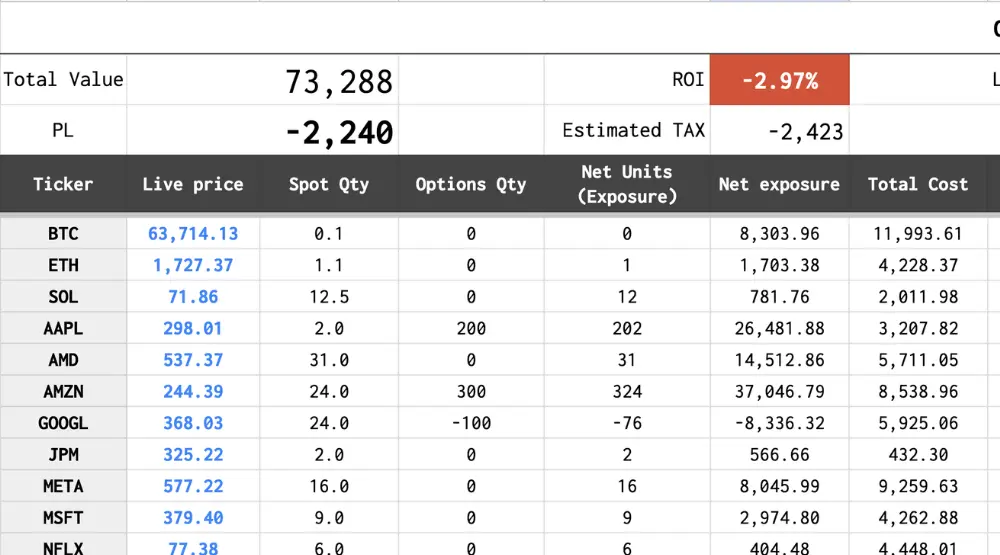
Your True Exposure, One Row per Ticker.
No more doing manual math to figure out your net position. tradeGIST rolls up every share, option contract, P&L, and tax liability into a single row per ticker.
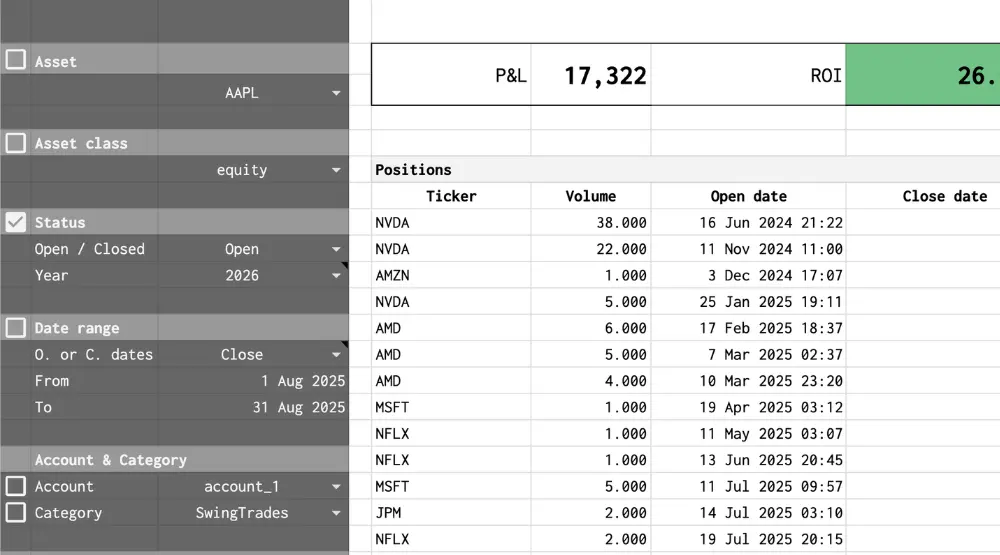
Slice and Dice Your Trading History.
No pivot tables to build or maintain. Filter your history by asset class, account, date range, or market sector to see where your P&L actually came from.
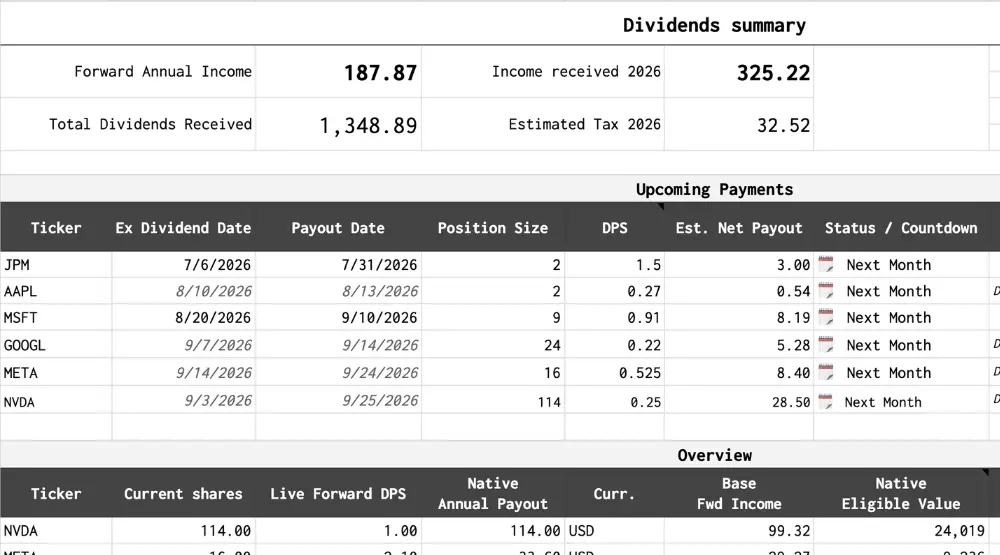
Visualize Your Dividend Income.
See your total dividends received, your projected forward annual income, and a calendar of upcoming payments — without tracking payout dates by hand.
The Cost Basis Accounting That Breaks Spreadsheet Formulas
Templates track prices. tradeGIST does the bookkeeping —
the part that determines what you actually owe and what you actually made.
You sold 40 shares in March. Which 40? Lot-level cost basis, FIFO or LIFO.
If you bought the same stock at three different prices, your taxable gain depends on which purchase each sale is matched against — that matching rule is all FIFO and LIFO mean: sell your oldest shares first, or your newest. tradeGIST does this matching at the individual lot level, across all your brokerage accounts, pooled together or kept strictly separate per account.
You took the loss. Then you bought back too soon. Automatic wash sale detection.
Sell at a loss and repurchase within the window, and that loss may be disallowed as a wash sale — easy to miss across accounts, painful to discover later. tradeGIST flags wash sales automatically as it processes your history. It helps you apply the rules; confirming your tax treatment remains between you and your tax adviser.
How wash sale detection worksYour US stock gained 8 percent. Your P&L says 3 percent. FX impact, separated out.
When you hold assets in a foreign currency, every position is two bets: the asset and the exchange rate. Most trackers silently blend them. tradeGIST reports them separately, so you can see whether a position made money because the asset moved or because your currency did.
How multi-currency tracking worksA spreadsheet formula only knows about today.
Live-price formulas recalculate and overwrite; your portfolio's past evaporates. tradeGIST records a snapshot of your portfolio every day at the close, building a permanent daily history of value, exposure and P&L that no API change or formula refresh can erase.
How daily snapshots workOne ledger for everything you actually hold.
Stock trades, option assignments and expiries, fractional crypto, dividends, cash movements — one transaction history, rolled up into one position per ticker with realised and unrealised P&L. No reconciling three apps that each see a third of your portfolio.
You shouldn't have to trust a stranger with your trading history.
tradeGIST runs as Google Apps Script inside your own Google account. Your transactions, balances and API keys stay in your spreadsheet and never reach tradeGIST's servers — I could not read your data even if you asked me to. Delete the file and everything is gone.
From Broker Export to Working Ledger
Three steps. The import is the real work — how long it takes depends on how much history you bring.
Install the Add-on
Install from the Google Workspace Marketplace. Your first run starts 14 days of full Pro — no signup, no email, no credit card. After that, continue on a paid plan, or stay on the free tier, capped at 30 transactions.
Read the setup guideImport Your History
Export your transaction history from your broker and paste it in. Stocks and ETFs price automatically through GOOGLEFINANCE — nothing to configure.
Optional: Add API Keys
Only if you trade crypto or options. CoinMarketCap has a free tier; Massive.com requires a paid plan. The keys stay in your sheet.
Setting up price sourcesWhat tradeGIST Doesn't Do
Three constraints, stated up front, so you can decide before you install.
It doesn't connect to your broker.
There is no API sync. You export your transaction history from your broker and import it — a real one-time cost when you start, and a few minutes per batch after that. The trade-off is deliberate: no connection also means no credentials shared and no third party sitting between you and your money.
Market data has three cost levels — one of them is paid.
Stocks and ETFs price through Google's native GOOGLEFINANCE: no API key, no cost. Crypto prices come from CoinMarketCap, which offers a free tier. Live options quotes come from Massive.com, which requires a paid plan — billed by Massive, separate from your tradeGIST license. Your keys stay in your spreadsheet, and you can substitute any data source of your own.
It is not tax software, and I am not an accountant.
tradeGIST computes cost basis, gains and wash sales so you have defensible numbers to work from. It does not generate tax forms, and nothing it produces is tax advice. Take the output to your accountant, not to your tax authority directly. The ledger itself is an ordinary Google Sheets™ file in your own Drive; it remains readable and usable regardless of what happens to tradeGIST or its developer.
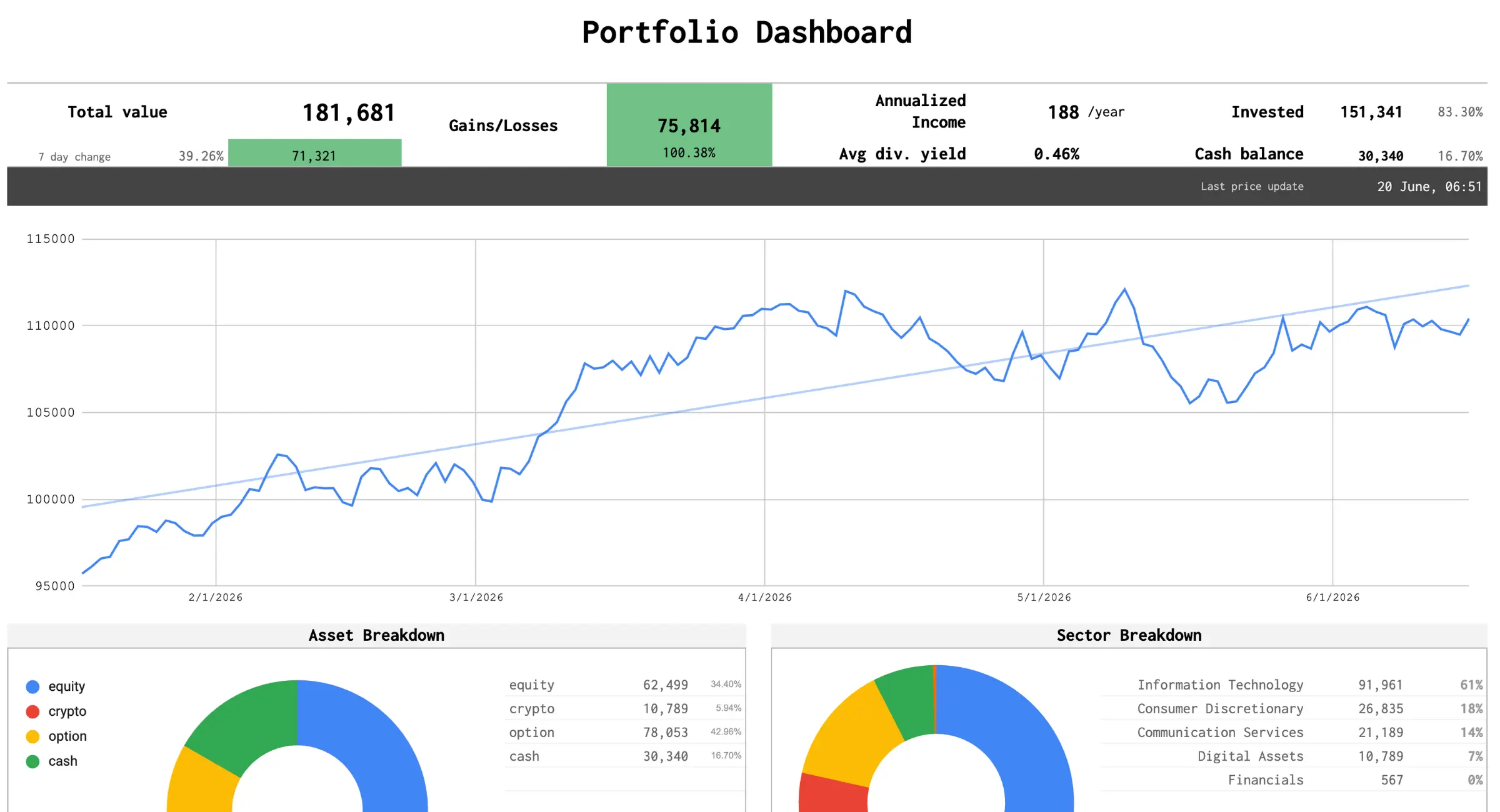
What the Generated Sheets Look Like

Comprehensive Performance Dashboard

Deep Dive Trade Analysis


Frequently Asked Questions
tradeGIST runs as Google Apps Script inside your own Google account. Your transactions, API keys, and trade history stay in your spreadsheet and are never transmitted to the developer. No portfolio data is stored in any external database, and there is no account to create. I could not read your data even if you asked me to.
Yes. tradeGIST records fractional crypto trades, stock shares, and option contracts in one ledger, then rolls them up into a single dashboard with multi-currency support throughout.
The matching logic runs in Google Apps Script, not in cell formulas. That allows lot-level FIFO/LIFO cost basis matching across multiple brokerage accounts, pooled together or kept separate per account. It also flags wash sales as your history is processed and records a daily snapshot of your portfolio. Formulas alone recalculate in place and keep no history.
For stocks and ETFs, the add-on uses native GOOGLEFINANCE formulas. For crypto and options, it connects to CoinMarketCap for crypto and Massive.com for options using your own API keys, which stay in your spreadsheet. You can also feed prices from any data source of your own, through a custom formula or Apps Script.
More questions? Read the full tradeGIST FAQ or contact support.
Start With Your Last Broker Export
Install the add-on, import your history, and see your cost basis, FX impact and P&L in one Google Sheets™ file you own. Installing starts 14 days of full Pro — no signup, no email, no credit card. After that, continue on a paid plan, or stay on the free tier, capped at 30 transactions. Whatever you imported stays in your sheet.
Get started free